So you’ve decided to dip your toes into the world of smart homes and honestly? Best decision you’ll make this year. Whether you’ve been eyeing those sleek smart speakers at the store, or your friend just showed off their voice-controlled lights and you thought “I need that in my life,” you’ve come to the right place.
The truth is, setting up a smart home can feel overwhelming at first. There are hundreds of devices, a dozen different ecosystems, and way too many acronyms floating around. But here’s the thing, it doesn’t have to be complicated. With the right guidance (and a solid starter kit), you can have a functioning, genuinely useful smart home up and running in a weekend.
This guide covers absolutely everything a beginner needs to know: what a smart home actually is, how to choose the right ecosystem, which devices to start with, how to set it all up, and how to keep expanding over time. Let’s dive in.
Table of Contents
1. What Is a Smart Home And Do You Actually Need One?
Let’s start with the basics. A smart home is simply a house where everyday devices; lights, thermostats, locks, cameras, appliances are connected to the internet and can be controlled remotely, automated, or managed through a central hub or app.
Think about it this way: instead of getting up to turn off the lights when you’re already cozy in bed, you just say “Alexa, turn off the bedroom lights.” Instead of worrying whether you locked the front door after you left, you check your phone and lock it from wherever you are. That’s the magic of a smart home.
The Real Benefits of a Smart Home
People often assume smart homes are purely a luxury, but the practical benefits are surprisingly substantial:
- Convenience: Control everything from your phone or with your voice, from anywhere in the world.
- Energy savings: Smart thermostats and lighting can reduce your energy bills by 10–23%, according to studies from the U.S. Department of Energy.
- Security: Smart locks, cameras, and sensors give you peace of mind whether you’re home or away.
- Accessibility: For people with mobility issues or disabilities, voice and app control can be genuinely life-changing.
- Increased home value: Smart home features are increasingly attractive to homebuyers and can boost property value.
💡 Pro Tip: You don’t need to automate everything at once. Start with one or two devices that solve a real problem in your life, and expand from there.
2. Choosing Your Smart Home Ecosystem: The Most Important Decision You’ll Make
Before you buy a single smart device, you need to pick your ecosystem. This is the platform that ties all your devices together and it’s the decision that will shape every purchase you make going forward.
The three major players are Amazon Alexa, Google Home, and Apple HomeKit. Here’s a no-nonsense breakdown:
Amazon Alexa
Alexa is hands-down the most popular smart home ecosystem, and for good reason. It supports the widest range of compatible devices (over 100,000+), has excellent third-party integrations, and the Echo device lineup is affordable and diverse.
- Best for: Most beginners, Android users, budget-conscious shoppers
- Strengths: Huge device compatibility, great shopping integration, excellent routines
- Weaknesses: Privacy concerns (more on that later), less polished app interface
Favorite Pick: Amazon Echo (4th Gen) — Best Starter Hub The best all-around smart speaker to start your Alexa ecosystem. Excellent sound, built-in Zigbee hub, and premium design
Favorite Pick: Amazon Echo Show 8 (2nd Gen) — With Screen Perfect if you want a visual display for recipes, video calls, and smart home controls. One of the best-selling Echo devices.
Google Home
Google Home shines for people already deep in the Google ecosystem; Gmail, Google Calendar, Google Photos, etc. Its natural language processing is arguably superior to Alexa for complex queries, and it integrates beautifully with Android phones.
- Best for: Android users, Google Workspace users, people who ask lots of questions
- Strengths: Superior voice recognition, excellent search, great Android integration
- Weaknesses: Fewer compatible devices than Alexa, Google has killed products before
Favorite Pick: Google Nest Hub (2nd Gen) A gorgeous smart display with sleep tracking built in. Great entry point for Google Home users.
Apple HomeKit
HomeKit is the premium option. It’s the most secure and privacy-focused ecosystem, and it integrates seamlessly with iPhones, iPads, Macs, and Apple Watches. The downside? It’s more expensive and has fewer compatible devices.
- Best for: iPhone users who prioritize security and privacy
- Strengths: Best-in-class privacy, Apple device integration, polished interface
- Weaknesses: Fewer compatible devices, higher price point, requires Apple hardware
Favorite Pick: Apple HomePod mini The sleek, compact hub for Apple HomeKit users.
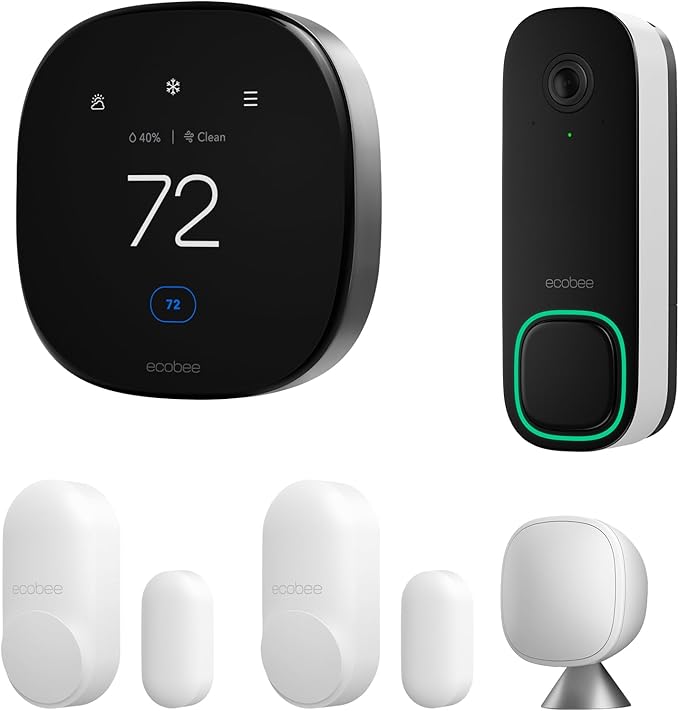
ecobee Total Security and Savings Bundle with Smart Doorbell Camera (Wired), SmartSensor for Doors and Windows, and Smart Thermostat Premium
- Enhance your smart home and make your devices work better together. Save video evidence in case of emergency, reduce home insurance costs by up to 10%, and get faster 911 responses. Get 1 free month of Ecobee Smart Security when you register your devices.
- Reduce your heating and cooling costs by 26% annually and breathe easier with air quality monitoring.
- Get smart notifications when your doors or windows are opened or closed
What About Matter?
Matter is a newer, universal smart home standard launched in 2022 that allows devices to work across ALL major ecosystems. More and more devices are now Matter-compatible, which means you won’t be locked into one ecosystem forever. If you’re starting fresh, look for Matter-certified devices for maximum future-proofing.
Our Recommendation: If you’re unsure, go with Amazon Alexa. It has the best device compatibility, the most beginner-friendly setup, and excellent value for money.
3. The Essential Starter Devices: Where to Begin
You don’t need to buy 20 devices to have a smart home. In fact, we recommend starting with just 3–5 devices that make an immediate, meaningful difference in your daily life. Here are the best places to start:
Smart Speakers / Displays (Your Control Center)
This is your central hub. Every smart home needs at least one smart speaker or display to act as the brain of the operation. We already covered the main options above, pick one that fits your ecosystem of choice.
Smart Lighting
Smart lighting is where most people start and it’s easy to see why. It’s affordable, easy to install (no wiring required), and delivers an immediate “wow” factor. You can dim lights with your voice, set schedules, change colors, and even sync them to your TV.
Amazon Pick: Philips Hue White & Color Ambiance Starter Kit The gold standard in smart lighting. Includes 4 bulbs and a hub. Insane color range, rock-solid app, and excellent ecosystem compatibility.
Amazon Pick: TP-Link Kasa Smart Bulbs (4-Pack), Budget Pick No hub required, these connect directly via WiFi. Perfect for Alexa and Google Home. Budget-friendly.
Amazon Pick: Govee RGBIC LED Strip Lights One of Amazon’s best-selling smart home items EVER. Gorgeous ambient lighting for TVs, desks, and shelves.
Smart Thermostat
A smart thermostat is one of the best investments you can make for your home. Not only does it let you control your home’s temperature from your phone, but it also learns your schedule and automatically adjusts to save energy. Most users recoup the cost within a year in energy savings.
Amazon Pick: Google Nest Learning Thermostat (3rd Gen) The OG smart thermostat. Learns your schedule, programs itself, and saves an average of 10–12% on heating bills. High-value product.
Amazon Pick: Ecobee SmartThermostat Premium Our top pick for Alexa users. Includes a room sensor, built-in Alexa, and air quality monitoring.
Smart Plug
Smart plugs are the quickest, cheapest way to add intelligence to any existing appliance; lamps, fans, coffee makers, you name it. Just plug them in and control the device via app or voice. No installation, no fuss.
Amazon Pick: Amazon Smart Plug (Alexa-Certified) Dead simple setup, literally plug it in, say “Alexa, discover devices,” and you’re done. Affordable entry point into smart home automation.
Amazon Pick: Kasa Smart Power Strip (3 outlets + 2 USB) Control multiple devices individually.
Smart Security Camera
Even if you’re not setting up a full security system, a smart doorbell camera or outdoor camera is a game-changer for home safety and package monitoring. Most have free cloud storage tiers and excellent app integrations.
Amazon Pick: Ring Video Doorbell (4th Gen) The most popular smart doorbell in the world. Color pre-roll video, advanced motion detection, Alexa integration.
Amazon Pick: Blink Outdoor 4 Security Camera Wireless, weatherproof, 2-year battery life. No monthly fees with Blink Subscription Plan.
Smart Lock
Smart locks let you lock and unlock your door remotely, create temporary access codes for guests or service workers, and get notifications whenever your door is locked or unlocked. Say goodbye to hiding a spare key under the mat.
Amazon Pick: Schlage Encode Plus Smart WiFi Deadbolt Works with Apple HomeKit and Alexa. No hub required. Built-in WiFi and fingerprint-free touchscreen.
Amazon Pick: August Wi-Fi Smart Lock (4th Gen) Installs over your existing deadbolt in minutes, no locksmith needed. One of the most popular smart locks on Amazon.
4. How to Set Up Your Smart Home: A Step-by-Step Guide
Okay, you’ve got your ecosystem and your starter devices. Now let’s actually set everything up. Here’s a simple, repeatable process that works for almost every smart home setup.
Step 1: Set Up a Strong, Dedicated WiFi Network
Your smart home is only as good as your WiFi. Most smart devices use 2.4 GHz WiFi (not 5 GHz), so make sure your router broadcasts both bands. If you have a large home, consider a mesh WiFi system to eliminate dead zones.
Amazon Pick: Eero Pro 6E Mesh WiFi System The best-selling mesh WiFi system on Amazon. Supports WiFi 6E, covers up to 2,000 sq ft per unit, and integrates natively with Alexa.
Step 2: Set Up Your Hub / Smart Speaker First
Before connecting any other devices, get your smart speaker or hub online. Download the companion app (Alexa, Google Home, or Apple Home), create an account, and connect it to WiFi. This becomes the foundation everything else connects to.

Amazon Echo Dot Max (newest model), Alexa speaker with room-filling sound and nearly 3x bass, Great for living rooms and medium-sized spaces, Designed for Alexa+, Glacier White
Step 3: Add Devices One at a Time
Don’t try to set up 10 devices at once. Add them one by one, testing each device fully before moving to the next. Most devices follow this simple pattern:
- Download or open the device’s app
- Power on the device
- Follow the in-app setup wizard
- Connect to your WiFi network
- Link to your smart home ecosystem (Alexa, Google, Apple)
- Test with voice commands and the app
Step 4: Organize Into Rooms
Once your devices are added, organize them by room in your smart home app. This is crucial, it lets you say things like “turn off all the living room lights” instead of naming each bulb individually.
Step 5: Create Groups and Scenes
Groups let you control multiple devices at once. Scenes (or “Modes” on some platforms) set multiple devices to specific states simultaneously. For example, a “Movie Night” scene might dim all the lights, turn on the TV, and lower the blinds, all with one command.
Step 6: Set Up Your First Automation
An automation (called a “Routine” in Alexa and Google Home) is a trigger-action pairing. For example: “When I say ‘Good morning’, turn on the bedroom lights at 50%, start the coffee maker, and tell me the weather.” Start with one or two simple automations and build from there.
⚠️ Important: Make sure all your devices are on the same WiFi network, and that your router is connected to the internet before troubleshooting any connection issues.
5. Smart Home Security and Privacy: What You Need to Know
This is the section most smart home guides skip , but it’s critically important. Connecting your home to the internet comes with real security considerations, and it’s worth taking 30 minutes to set things up properly.
Use Strong, Unique Passwords
Every smart home account should have a unique, strong password. Use a password manager to keep track of them. Never reuse passwords across different smart home platforms.
Amazon Pick: YubiKey 5 NFC Security Key Hardware two-factor authentication for your most important accounts. Premium security product.
Enable Two-Factor Authentication
All major smart home platforms (Amazon, Google, Apple) support two-factor authentication. Turn it on. It’s the single most effective thing you can do to protect your smart home accounts.
Keep Your Devices Updated
Smart device manufacturers regularly release firmware updates that patch security vulnerabilities. Enable automatic updates where possible, and manually check for updates on devices that don’t auto-update.
Use a Separate IoT Network
Many modern routers let you create a separate guest or IoT network for your smart devices. This isolates them from your main devices (laptops, phones), so if a smart device gets compromised, it can’t easily reach your sensitive data.
Review App Permissions
Before installing any smart home app, review what permissions it requests. Does a smart plug really need access to your contacts? If an app requests permissions that don’t make sense for its function, that’s a red flag.
6. Automations and Routines That Will Actually Change Your Life
This is where smart homes go from “neat” to genuinely life-changing. Automations run on their own, no voice commands required. Here are some of our favorite beginner automations:
Morning Routine
- Lights gradually brighten 30 minutes before your alarm (gentle wake-up)
- Coffee maker turns on automatically when your alarm goes off
- Thermostat adjusts to your “daytime” temperature
- Smart display shows the day’s weather, calendar, and commute time
Away Mode
- When everyone leaves home, thermostat switches to eco mode
- All indoor lights turn off
- Security cameras arm automatically
- Smart lock locks the front door
Bedtime Routine
- “Alexa, goodnight” dims all lights to zero over 10 minutes
- Front door locks
- Thermostat switches to sleep temperature
- White noise machine turns on
Arrival Home
- Front door unlocks automatically when your phone’s location is detected nearby
- Entryway lights turn on at your preferred brightness
- Thermostat adjusts to your comfort temperature
💡 Start with just ONE automation. Run it for a week, see how it fits your life, then add another. Don’t try to automate everything at once, you’ll end up with a system that doesn’t work for your actual routine.
7. Expanding Your Smart Home Over Time
Once you have the basics running smoothly, the fun begins. Here are some of the best categories to explore as you expand your smart home:
Smart Blinds and Shades
Motorized blinds that open and close on a schedule are genuinely luxurious and they have real energy benefits by managing solar heat gain. They’re one of the priciest smart home categories but also one of the most impressive.
Amazon Pick: Bringnox Smart Block-Out Roller Blind One of the most affordable smart blind options available. Battery-powered, compatible with Alexa and Google, and IKEA-quality construction.
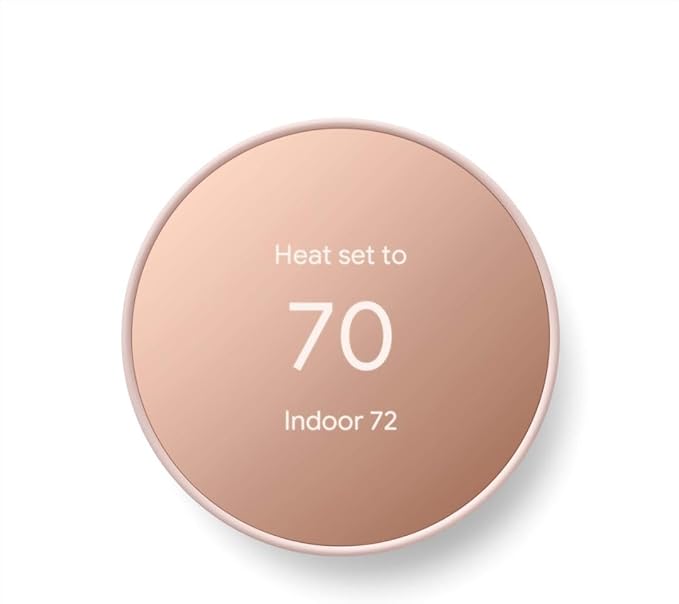
Google Nest Thermostat – Smart Thermostat for Home – Programmable Wifi Thermostat
Smart Appliances
From smart refrigerators that let you see inside while grocery shopping, to smart ovens you can preheat from the car, connected appliances are becoming mainstream. They tend to be pricier, but the convenience factor is undeniable.
Amazon Pick: iRobot Roomba j7+ (Self-Emptying Robot Vacuum) One of the best-selling smart home products period. Self-empties, avoids obstacles, works with Alexa and Google.
Smart Irrigation
A smart sprinkler controller can reduce your outdoor water usage by up to 50% by checking local weather data and skipping scheduled watering when rain is forecast.
Amazon Pick: Rachio 3 Smart Sprinkler Controller The #1 best-selling smart irrigation product on Amazon. Weather intelligence, Alexa & Google integration.
Smart Smoke and CO Detectors
Smart smoke detectors connect to your phone and send alerts even when you’re not home. They can also integrate with other smart devices, for example, triggering all lights to turn on if smoke is detected at night.
Amazon Pick: Google Nest Protect Smoke + Carbon Monoxide Alarm The gold standard in smart smoke detectors. Speaks to tell you exactly where the problem is.
Smart Home Display / Tablet Dashboard
Mounting a tablet on your wall as a permanent smart home control panel is a popular upgrade. It gives everyone in the household an easy, visual interface that doesn’t require remembering voice commands.
Amazon Pick: Amazon Fire HD 10 Tablet Amazon’s own tablet is perfect for a wall-mounted smart home dashboard. Alexa built-in, affordable, and Amazon pushes Show Mode specifically for this use case.
8. Common Beginner Mistakes to Avoid
Here’s what NOT to do:
- Mixing ecosystems carelessly: Buying an Alexa device here, a HomeKit device there, and a Google device somewhere else. Devices CAN cross ecosystems (especially with Matter), but it adds complexity. Stick to one primary ecosystem for at least your first year.
- Buying cheap WiFi: Your smart home will only be as reliable as your internet connection. Don’t skimp on your router.
- Setting up automations before establishing habits: Automate the things you ALREADY do consistently, not the things you wish you did.
- Ignoring security: See Section 5. Seriously. Don’t skip this.
- Buying too much at once: Start small. A smart home is a marathon, not a sprint. Many people buy 10 devices, feel overwhelmed during setup, and give up entirely.
- Not considering WAF (Spouse/Partner Acceptance Factor): Your smart home should work for everyone in the household. If your partner can’t figure out how to turn on the living room lights, that’s a problem. Keep it simple.
- Forgetting about power outages: Smart devices lose internet connectivity during power outages. Have a backup plan (and maybe some battery-powered flashlights).
9. Budget Breakdown: How Much Does a Starter Smart Home Cost?
One of the most common questions we get is: “How much is this going to cost me?” Here’s a realistic breakdown:
Starter Kit (~$200–$350 total)
- Smart speaker (Echo or Nest): $50–$100
- Smart bulbs (4-pack): $30–$50
- Smart plug (2-pack): $20–$30
- Smart video doorbell: $80–$180
Intermediate Kit (~$500–$800 total)
- Everything above, plus:
- Smart thermostat: $120–$250
- Smart lock: $150–$250
- Mesh WiFi router: $100–$300
Full Smart Home (~$1,500–$3,000+)
- Everything above, plus smart blinds, robot vacuum, outdoor cameras, irrigation controller, and smart appliances.
💰 Money-Saving Tip: Watch for Amazon Prime Day, Black Friday, and Cyber Monday deals. Smart home devices regularly see 30–50% discounts during major sales events. Setting up price alerts via CamelCamelCamel (Amazon price tracker) can save you hundreds.
10. The Best Resources for Continuing Your Smart Home Journey
The smart home space moves fast. Here are the best ways to stay current and keep learning:
- Reddit communities: r/homeautomation and r/smarthome are goldmines of real-world advice, device reviews, and automation inspiration.
- YouTube channels: Search for your specific devices, most popular smart home products have dozens of beginner tutorials.
- Manufacturer apps: Amazon Alexa, Google Home, and Apple Home apps all have built-in suggestion engines that recommend new automations based on your devices.
- Home Assistant: When you’re ready to go advanced, Home Assistant is a free, open-source smart home platform that gives you total control. It has a steep learning curve but unlimited possibilities.
Final Thoughts: Start Simple, Dream Big
Building a smart home is one of those projects that genuinely gets better the longer you invest in it. Start with one small thing; a smart speaker, a few smart bulbs and let the convenience speak for itself. Before you know it, you’ll be dreaming up automations, researching the latest devices, and converting everyone you know.
The most important thing is to start. Don’t wait until you’ve researched every possible option or have the perfect plan. Pick an ecosystem, buy a starter kit, and get it set up this weekend. Future you will thank you. Catch up with our home decor tips here.